Built for the certified plant
PCI MNL-116: Structural
Bridge girders, double tees, hollowcore, columns, walls.
PCI MNL-117: Architectural
Cladding panels, decorative facade, finish-critical work.
NPCA QCM-001: Utility & Drainage
Manholes, vaults, septic, drainage, box culverts.
State DOT certification programs
TxDOT, FDOT, Caltrans, and other AASHTO-aligned programs.
Any plant size
From minor DOT-only producers to multi-line operations. Non-certified plants run the same flow without certification locks.
Five sections, one daily flow
Open the platform and your shift is in front of you. No menus full of irrelevant options. The platform follows the order of work on the plant floor.
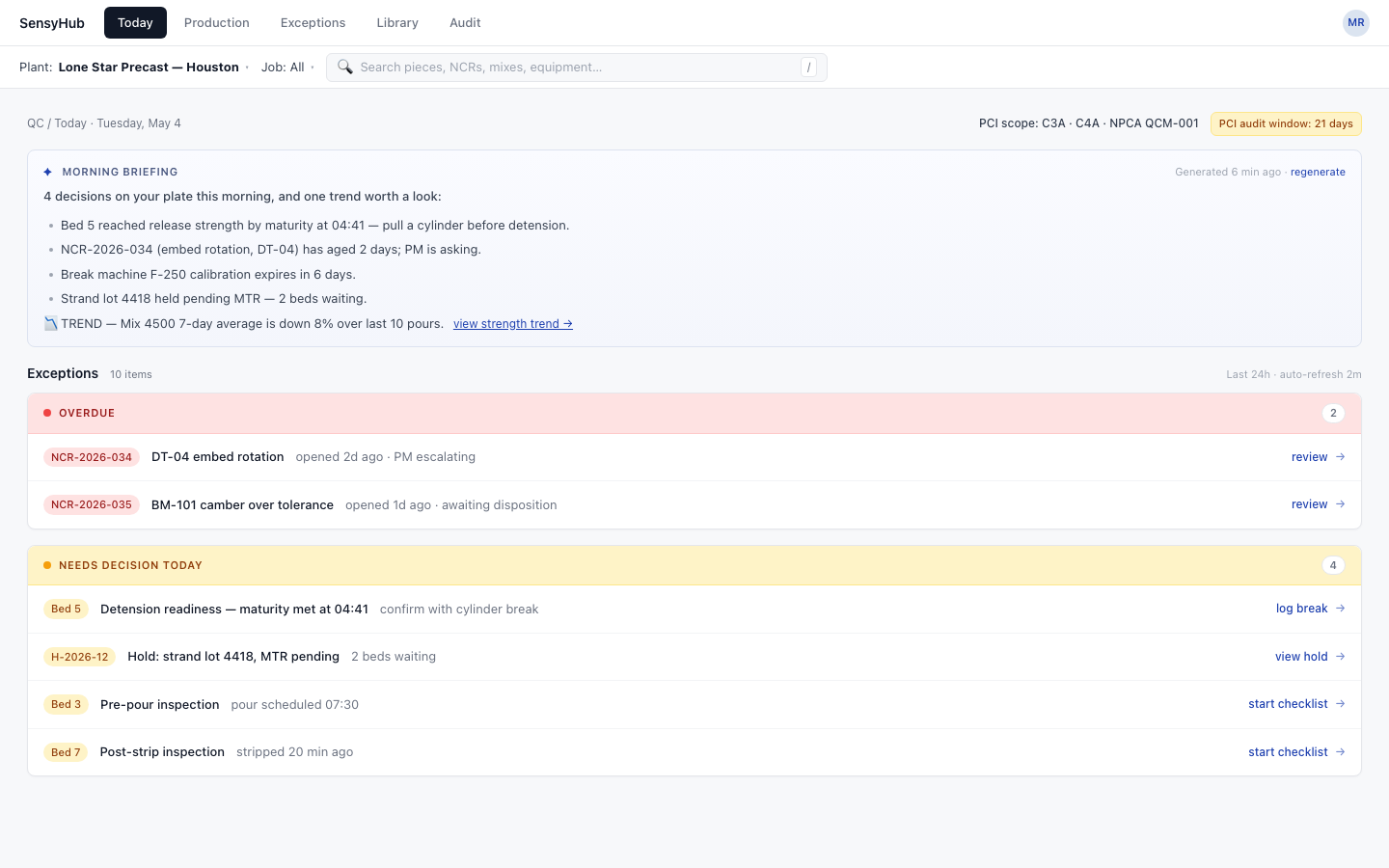
Open the platform, see the shift.
An AI briefing of what needs a decision today, then exceptions grouped by severity: overdue, needs-decision-today, expiring soon, statistical drift. One click into the disposition.
- AI morning briefing of what's on your plate
- Severity-grouped exceptions, not a flat list
- One click into the right action
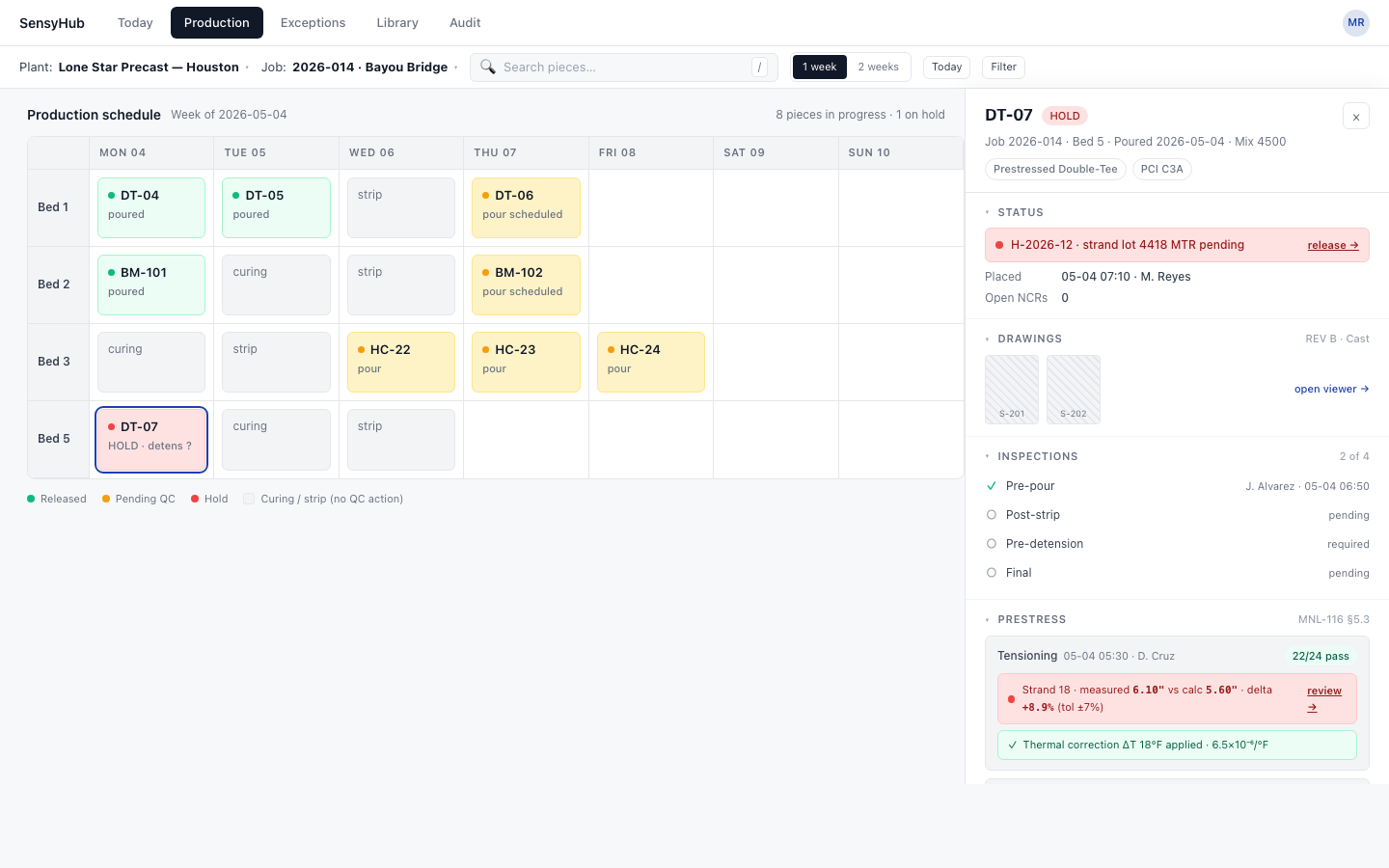
The bed schedule, end to end.
Each day's pour, cure, strip, and detension stage in one grid. Click any piece to see drawings, inspections, batch logs, break logs, and prestress checks, all tied to the pour record.
- Bed-by-bed weekly view, color-coded by stage
- Stickers, breaks, batch logs in flow
- Holds and pending-QC visible at a glance
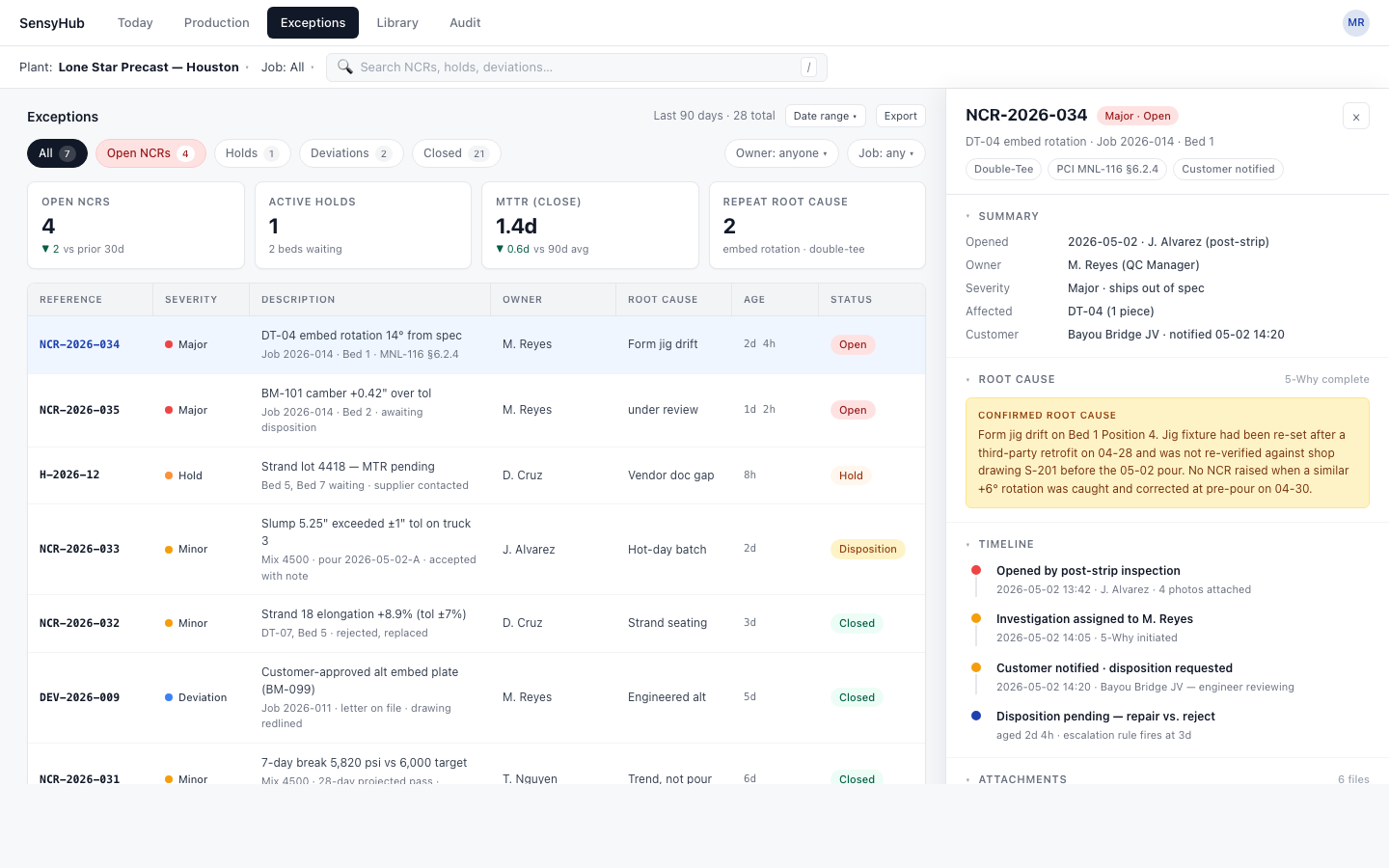
NCRs with owners, ages, and closeout.
Every non-conformance is tied to a piece, a pour, and an owner. KPIs at the top, the full disposition history on the side. Filter by severity, owner, age, or job.
- KPIs across open, overdue, and aging
- Disposition history per NCR
- Auto-routes to the right owner
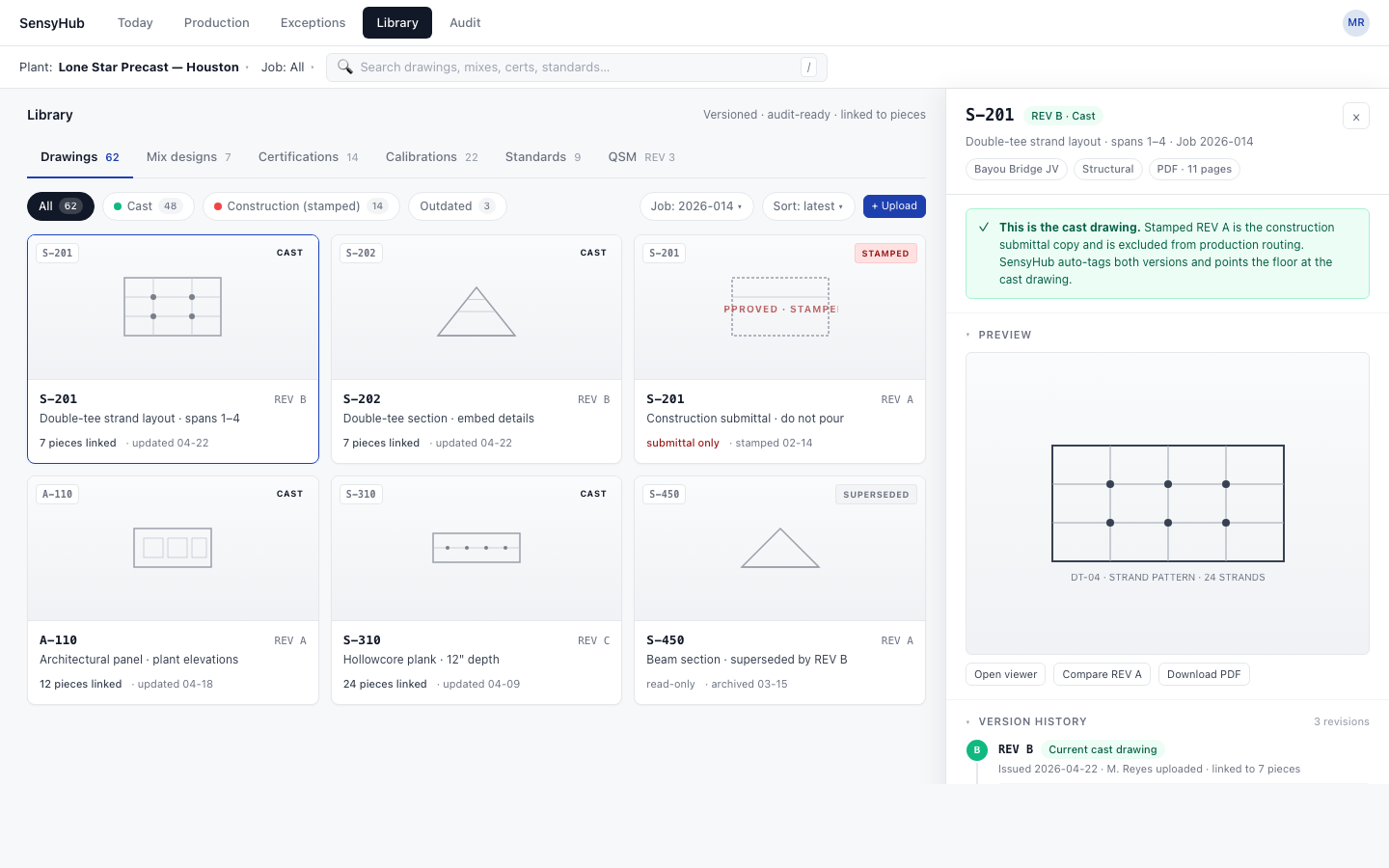
Cast vs construction drawings, versioned.
Drawings, mix designs, certifications, calibrations, and standards documents in one searchable library. Cast drawings drive production. Construction (stamped) drawings sit in the audit trail. Revisions are explicit at every pour.
- Auto-tagged cast vs construction (stamped)
- Revision history per piece, per pour
- Versioned mix designs and calibrations
PCI, NPCA, or DOT export in one click.
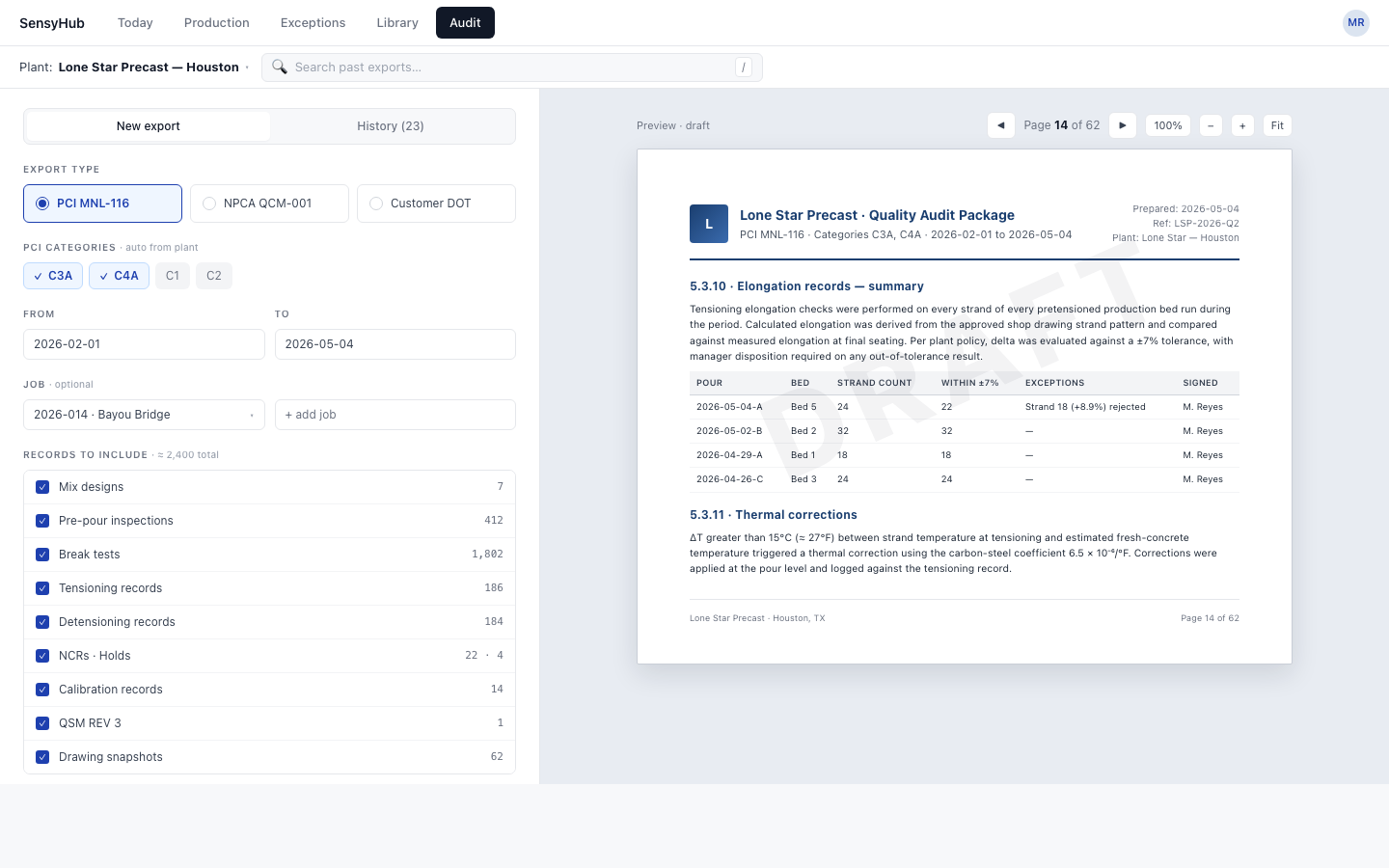
Pick the certification scope, the date range, and the records you want included. The platform builds the audit package from the actual day-to-day records, generated as you work, not assembled the week before the inspector arrives.
- PCI MNL-116/117, NPCA QCM-001, DOT modes
- Live preview of the export PDF
- Export history kept for re-issue
Per-plant configuration
One platform, configured per site. Each plant runs the right certification program with the right features turned on. Multi-plant operations roll up across sites.
Why it matters to a buyer
Replaces PDFs, whiteboards, and spreadsheets with one daily flow.
The trail is generated as you work, not assembled the week before the auditor arrives.
Review your existing ERP or schedule format during the demo. Confirm import fields and any connection work before implementation.
Evaluate a Complete Pour Record Before Rollout
Bring a pour schedule, a drawing set, and your current QC checklists. Walk one pour from pre-pour inspection through export to check that the fields and responsibilities match your process.
What the plant supplies
Beds, pieces, mixes, users and permissions; drawing revisions; inspection checklists; batch and break formats; and quality-program requirements.
What the demo should show
The link between pour, piece, current drawing, inspections, breaks, and NCRs. Review a correction, an open hold, and the exported history with your QC lead.
What to scope for rollout
Confirm imports and integration, record migration, training, support, data access, and exports. Agree on owners and criteria for accepting the configuration.
Plant certification depends on the applicable PCI, NPCA, or DOT program and the plant’s procedures. SensyHub QC organizes the records; your QC team validates checklists and documentation against current requirements.
For evidence of the monitoring and curing inputs behind a QC review, read the NAPCO demonstration with SensyCast and SensyCure. That case documents sensors and cylinders; evaluate the QC module with your own workflow, integration, and export requirements.
Frequently Asked Questions
Does the SensyHub QC Module replace our ERP?
SensyHub QC complements your scheduling system. Bring a pour schedule and your current formats to review field mapping, imports, and any required connection work. An available API does not establish a completed integration; confirm scope, ownership, and maintenance before purchase.
Which PCI manuals does the QC module support?
Both major PCI plant-certification manuals: PCI MNL-116 for structural precast and bridge products (girders, double tees, hollowcore, columns, walls), and PCI MNL-117 for architectural precast (cladding panels and decorative facade). Each is a first-class checklist mode driven by the plant profile. Plants certified to more than one manual can run them in parallel on the same site.
Does it support NPCA QCM-001 plants?
Yes. NPCA QCM-001 is a first-class checklist mode. Plants producing utility, drainage, manholes, vaults, septic, or other NPCA scopes can run the daily flow in NPCA mode and produce QCM-001 audit documentation.
Does it support state DOT plant certification programs?
Yes. State DOT certification is a first-class mode. The module supports TxDOT, FDOT, Caltrans, and other AASHTO-aligned state DOT plant certification programs. Plants that ship to a single DOT or to multiple DOTs can configure each program independently and run them in parallel where required.
What if our plant isn't certified to PCI, NPCA, or a DOT program?
The plant profile supports a custom QC checklist with certification-specific checklists turned off. Using the software does not confer PCI, NPCA, or DOT certification; the plant remains responsible for its procedures and audit requirements.
We run multi-plant with different certifications. Can we do that on one platform?
Yes. Each plant has its own profile. One plant can run PCI MNL-116 structural while another runs NPCA QCM-001 utility and a third runs a TxDOT bridge program. Stresses toggle on or off and the right certification program is selected per site. QC managers see only the plant they're working from. Corporate quality leaders can roll up across plants.
How are drawings handled?
The module distinguishes cast drawings (the per-piece sheets the crew pours from) from construction drawings (the broader project drawings) and tracks revisions on each. Drawings auto-link to jobs, and the system always points the crew at the correct sheet for production. Approved or stamped construction drawings are kept in the Library for the audit trail, while the active cast drawing drives the daily flow. No more pouring off the wrong sheet.
How do NCRs work in the QC module?
Non-conformance reports (NCRs) are captured in the Exceptions section and tied directly to the pour record, the piece, and the affected drawing. Each NCR has an owner, a disposition, and a closeout trail. Auditors can pull the full history at any point.
Can auditors actually see the trail?
Yes. The Audit section is built specifically for inspectors. It surfaces the day's QC records, NCRs, batch logs, break logs, sticker history, scheduled recurring checks, and drawing references in one read-only timeline view. Records export to PDF for closeout.
How do we get started? Is there pricing?
Pricing is plant-based and depends on production volume, beds or lines, and checklist modes. Rollout timing depends on data readiness, schedule import, configuration, and training. Request a demo using your actual schedule to agree on scope, cost, and acceptance criteria.
Run your QC day on a platform that matches the plant.
Share your schedule, forms, and PCI, NPCA, or DOT scope. Review a pour, an exception, and an export with the team before agreeing on the rollout.
Book a Demo of the QC Module